Showing posts with label Computer. Show all posts

Trick to enable GodMode in windows 7/8

Leave a Comment
A lesser known feature of Windows 7/8 called GodMode enables you to create a folder which contains all the settings and features.
The folder simply contains all the links of the settings. It is akin to the Control Panel, but with a lot more features.


  • Create a new folder by right clicking on Desktop, selecting New, and then choosing Folder. ( Can be created anywhere though )
  • Rename this folder to "GodMode.{ED7BA470-8E54-465E-825C-99712043E01C}".
  • When you press Enter, the folder icon changes to a kind of Settings Icon.
  • Open the folder and you have direct access to hundreds of Settings. These are further categorized as Action Center, Administrative Tools, Auto-play, Font, Sound, etc.
This feature can be very useful when you do not know how to access certain settings of your Windows PC. This feature lists all the settings so that you can modify them from a single place and save time.
Read More

9 things MS Calculator can do that you don't know

Leave a Comment
This guy can do a lot more than many of us know.


1. It can Saves 'History'


2. Scientific calculator:

3. For a programmer:

4. For a statistician:

5. Unit Conversion:

6. Date calculator :

7. Worksheet:

8. All this can be accessed from 'View' dropdown at the top left.


9. Last but not least, Ctrl+C (Copy, without even selecting the number) and Ctrl+V (paste) works.

Read More

Check if the receiver has got the mail or not

Leave a Comment
When we do any IM chat we easily know whether or not the receiver has seen the message. But what about emails ?? We can just send the mail and wait for the reply.
Now comes an extension called Streak for Gmail. Along with many other features, it allows us to find out correctly whether the recipient has seen the mail and at what time and also at which location (but the correctness of this location information should be taken with a grain of salt)Benefits- For the cases where the recipient gets mass mailings we can find if he/she has seen the mail, like mailing any customer care/helpdesk  service or an HR of a company.


  • It is best for mailing the professors of foreign universities for applying for an internship or any other purpose to have an idea of his receipt of mail. This extension also allows to schedule emails to send later at a particular time so that one can send at the relevant time i.e. the time when any general professor will check his/her mail in his/her (foreign) time zone. This allows to have a better chance of having our mail seen by him/her.
Email tracking works by embedding an invisible pixel into the email. When the recipient reads the email, their client makes a request to the servers of streak so they know that it's been read, along with some other information (city, device) and give this information to the sender

PS -1. This extension is actually for personal CRM (Customer relationship management)
2. Users of Firefox can use Yesware -
yesware.comYesware | Sell Smarter.
Read More

Dealing with Shortcut Virus

Leave a Comment

Dealing with Shortcut Virus:

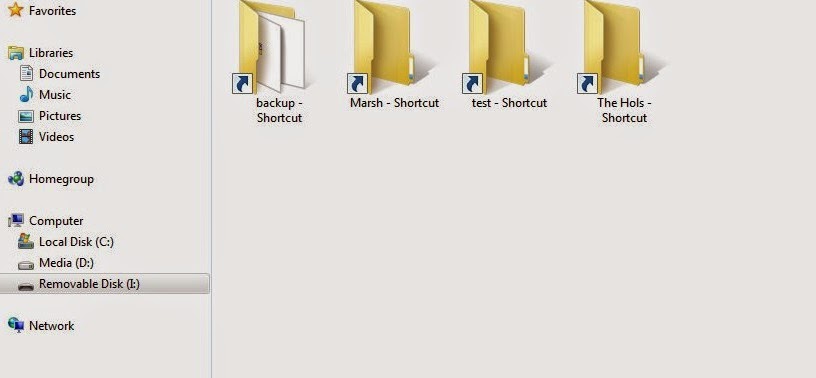
The most commom virus menace for Windows users is the shortcut virus changing all your files and folders in pendrive to shortcuts. It's a familiar problem among most college students. We have all tried to use the ineffective shortcut virus remover, a third party software, to solve the problem. But it is very simple to deal with.


  1. Delete all the shortcuts from the pendrive. They can be identified by the arrow symbol in icons and having a size of less than 4kB usually.
  2. Now open command prompt.
  3. Go to the pendrive by typing <alphabet assigned to drive>:
  4. Now enter the magic line attrib -s -h /S /D
  5. Wait for some time... It's done! All your files and folders are back.
The secret behind this:
The virus only changes the folders' system attributes, makes it hidden and creates shortcuts. So by removing the shortcuts, and removing the hidden and system attributes from all files and folders, you have terminated the virus without trace!
Read More

5 unknown facts about Google Analytics?

Leave a Comment

 What are some unknown facts on Google Analytics?


1. AVERAGE TIME ON PAGE

Did you know that in Google Analytics, when the program calculates the average time on a page for your website, that it does not take into account the last page in the session? So for example, say I go to http://www.hindufaqs.com. I start on the home page, then go to the SEO page and eventually end up on the social media page. The time I spent on that social media page is not counted in the average time on page. So why would Google do this? The main reason, in so many cases, the person leaves their browser open and that last page, and then walks away from their computer to do something else. Or maybe they just start doing something else on their computer and leave that page open. Either way, Google Analytic’s does not count the time on page for the last page in the session.

2. ISSUES WITH FAKE TRAFFIC

The normal fairly educated analytics user is now just starting to understand that not all the traffic to their website is correct. In some cases, bots can inflate traffic significantly. You can usually see when this happens because one IP address will send a significant amount of visits. Outside of this, and the fact that there are now thousands of these bots on all levels online, there are just general issues with looking at traffic data. For example, maybe multiple people use one computer or one person uses multiple devices. If you site is accessed more than one time in each of these situations, it can throw your numbers. Also, don’t forget to block traffic numbers from all the people you work with, right?

3. SERVER VS TAGS VS THIRD PARTY

Most people don’t really realize how analytics tools work. There are four main ways. The first is a server side analytics tool. Most hosting companies offer a basic program like this, but they are not advanced enough in almost all cases to make any marketing decisions. Third party analytics program, such as SEM Rush, Alexa, Quantcast, etc, look at certain metrics regarding how the Internet interacts with your website. Some of these third-party analytic tools can be fairly accurate. However, they are usually not precise.
Tags, or code that is placed on your actual website, allows the analytics program to capture information following a page load. Google Analytics is actually a hybrid of a tag and Server based analytic program, and therefore the fourth option. This generally thought to be the most accurate. But this may all change with the new Universal analytics.

4. THE ISSUE WITH JAVASCRIPT

One of the main reason why analytics tools do not count hits from robots is because robots do not execute Javascript. This allows them to not report on this data. However, it should be known that in the United States, 2 to 3% of web browsers also do not have Javascript enabled. Therefore, that traffic is never accounted for.

5. ANALYTICS TRACKING CODE NOT INSTALLED

One issue with a tag or website based analytics tracking program, such as Google Analytics, is that if you do not have the analytics code installed on the page, that page will not be tracked. This is especially an issue with larger websites, who are predicted to be missing website tracking code on as much as 20% of their pages. Think of how much traffic is not being accounted for! This is a huge issue, and it speaks lengths about having an analytics person or using an agency if you have a large web presence. We recently had 2 large clients discover that tracking code was not on large sections of the website, so it happens often.

Credits: To the Original Post(from Net)
Read More
Previous PostOlder Posts Home
Powered by Blogger.

Popular Posts

Featured Slider

Spirits THEME

Featured Posts

Premium Sponsor

Followers