Showing posts with label Tips. Show all posts

How to correctly peel off a Sticky Note

Leave a Comment

Although sticky notes are called sticky notes, they don’t always stick that well. They tend to curl up, and fall to the floor after a while

 
But there is a solution in the way you peel off the sticky note.
The traditional way is:


But when you do it this way, the sticky note will curl up and disappear from your wall after a little while. With the risk of ending up in the dustbin. There goes your splendid idea or “must not forget” thingy for that important presentation.

The better way is to peel if off from left to right:


When you stick this sticky note to the wall, you’ll notice that it doesn’t curl up, and thus will stick many times longer.

This picture shows the difference:


Happy Sticking !
Read More

Trick to enable GodMode in windows 7/8

Leave a Comment
A lesser known feature of Windows 7/8 called GodMode enables you to create a folder which contains all the settings and features.
The folder simply contains all the links of the settings. It is akin to the Control Panel, but with a lot more features.


  • Create a new folder by right clicking on Desktop, selecting New, and then choosing Folder. ( Can be created anywhere though )
  • Rename this folder to "GodMode.{ED7BA470-8E54-465E-825C-99712043E01C}".
  • When you press Enter, the folder icon changes to a kind of Settings Icon.
  • Open the folder and you have direct access to hundreds of Settings. These are further categorized as Action Center, Administrative Tools, Auto-play, Font, Sound, etc.
This feature can be very useful when you do not know how to access certain settings of your Windows PC. This feature lists all the settings so that you can modify them from a single place and save time.
Read More

9 things MS Calculator can do that you don't know

Leave a Comment
This guy can do a lot more than many of us know.


1. It can Saves 'History'


2. Scientific calculator:

3. For a programmer:

4. For a statistician:

5. Unit Conversion:

6. Date calculator :

7. Worksheet:

8. All this can be accessed from 'View' dropdown at the top left.


9. Last but not least, Ctrl+C (Copy, without even selecting the number) and Ctrl+V (paste) works.

Read More

Check if the receiver has got the mail or not

Leave a Comment
When we do any IM chat we easily know whether or not the receiver has seen the message. But what about emails ?? We can just send the mail and wait for the reply.
Now comes an extension called Streak for Gmail. Along with many other features, it allows us to find out correctly whether the recipient has seen the mail and at what time and also at which location (but the correctness of this location information should be taken with a grain of salt)Benefits- For the cases where the recipient gets mass mailings we can find if he/she has seen the mail, like mailing any customer care/helpdesk  service or an HR of a company.


  • It is best for mailing the professors of foreign universities for applying for an internship or any other purpose to have an idea of his receipt of mail. This extension also allows to schedule emails to send later at a particular time so that one can send at the relevant time i.e. the time when any general professor will check his/her mail in his/her (foreign) time zone. This allows to have a better chance of having our mail seen by him/her.
Email tracking works by embedding an invisible pixel into the email. When the recipient reads the email, their client makes a request to the servers of streak so they know that it's been read, along with some other information (city, device) and give this information to the sender

PS -1. This extension is actually for personal CRM (Customer relationship management)
2. Users of Firefox can use Yesware -
yesware.comYesware | Sell Smarter.
Read More

Dealing with Shortcut Virus

Leave a Comment

Dealing with Shortcut Virus:

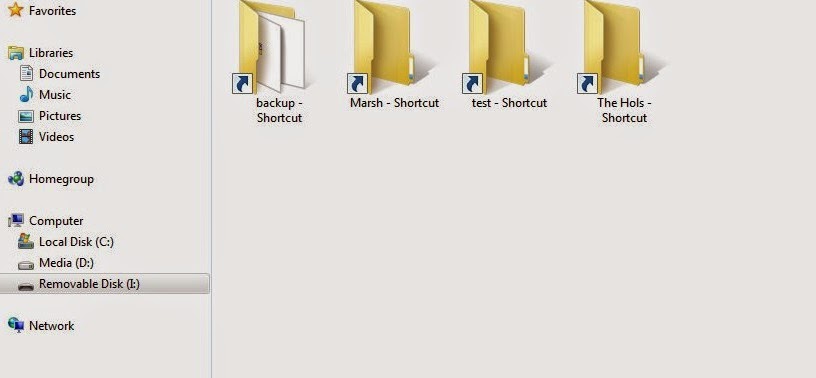
The most commom virus menace for Windows users is the shortcut virus changing all your files and folders in pendrive to shortcuts. It's a familiar problem among most college students. We have all tried to use the ineffective shortcut virus remover, a third party software, to solve the problem. But it is very simple to deal with.


  1. Delete all the shortcuts from the pendrive. They can be identified by the arrow symbol in icons and having a size of less than 4kB usually.
  2. Now open command prompt.
  3. Go to the pendrive by typing <alphabet assigned to drive>:
  4. Now enter the magic line attrib -s -h /S /D
  5. Wait for some time... It's done! All your files and folders are back.
The secret behind this:
The virus only changes the folders' system attributes, makes it hidden and creates shortcuts. So by removing the shortcuts, and removing the hidden and system attributes from all files and folders, you have terminated the virus without trace!
Read More
Previous PostOlder Posts Home
Powered by Blogger.

Popular Posts

Featured Slider

Spirits THEME

Featured Posts

Premium Sponsor

Followers